

Be the business people find first on Google Maps.
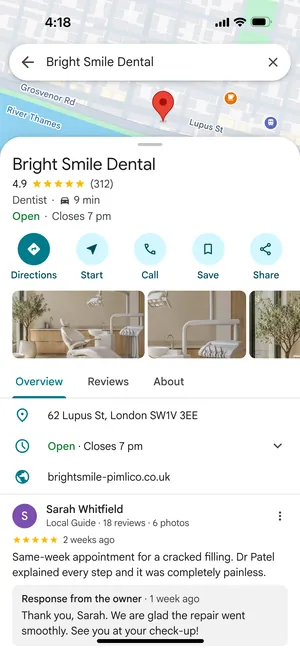
For local businesses the Business Profile is often the first impression, before the website and before the call. We build it, protect it and keep it working, then measure it in calls, direction requests and bookings.
- Complete, verified and accurate listings
- Reviews answered and Q&A covered
- Suspensions and lockouts handled by Google Maps Rescue
Listing stuck? Start here.
Management starts once your listing is live and in your hands. If it is not, start with one of these.
- Google Maps Rescue Suspended, can't verify or locked out? We handle the case with Google's Business Profile team. You pay nothing until it's fixed. See how it works
- Free listing check Answer a few questions and get the official next step for your listing, free. Check my listing
- Google Maps guides Step-by-step fixes for suspension, verification and ownership, checked against Google. Read the guides
Who it is for
-
Clinics and healthcare
Dental, medical and beauty clinics where patients search by area and compare reviews before they book.
-
Restaurants and retail
Places people choose on the spot, from the map, by distance, photos and opening hours.
-
Trades and home services
Plumbers, cleaners, movers and contractors who serve an area and need calls, not clicks.
-
Multi-branch businesses
Chains and franchises that need every branch consistent, verified and owned by the company.
What usually goes wrong
-
You are not in the top results
Competitors with weaker businesses show above you because their listing is more complete and more active.
-
Wrong or missing details
Old hours, the wrong category or a misplaced pin quietly cost you visits every week.
-
Reviews left unanswered
Unanswered reviews, especially negative ones, tell searchers nobody is listening.
-
Suspended or unverified
A suspension or a failed verification removes you from Maps until it is fixed the right way.
-
Someone else owns it
An old agency or a former employee controls the listing, and you cannot change anything.

What we do
One accountable team for the listing, the reviews and the local search signals around it.
-
Setup and verification
Create or claim the profile, verify it through Google’s official methods and keep ownership with you.
-
Profile optimisation
Primary and secondary categories, services, attributes, hours, service areas and an accurate pin.
-
Photos and posts
A steady plan of real photos and posts that show the business as it is today.
-
Reviews and Q&A
A fair way to ask every customer for a review (never only the happy ones), a reply to every review, and answers in the Q&A.
-
Local SEO
Consistent name, address and phone across the web, local pages on your site and LocalBusiness schema.
-
Protection
Owner access kept in your account, edits watched, and risky changes avoided before they trigger a review.
-
Recovery
Suspended, unverified or taken over? Google Maps Rescue handles the case, and you pay only when Google confirms the fix.
-
After a rescue
The first 14 days after a fix are delicate: we keep the name, address, category and description still, then build the listing up step by step.
-
Reporting
Monthly numbers from the profile itself: calls, direction requests, website clicks and searches.

What we report every month
- Calls from the profile
- Direction requests
- Website clicks
- Searches that showed your listing
- New reviews and average rating
- Ranking across your service area
Fix it yourself, step by step.
- Google Business Profile suspended for suspicious activity: how to appealGoogle does not publish what counts as suspicious activity, but its appeals tool shows the reason for the decision and links to the policy involved. Check that your Google Account itself is not restricted, bring the profile in line with Google's guidelines, then submit one appeal with documents whose name and address match the profile. Do not create a new profile for the same business.
- Google Business Profile suspended for quality issues: what it means and what to fix firstA quality issues notice means Google believes the profile does not follow its guidelines for representing a business. Google does not publish a separate page for that wording, but its appeals tool shows the reason and links to the policy involved. Fix the profile so it matches the guidelines first, then send one appeal with documents that match the corrected details.
- Google Business Profile restricted or limited: what it means and what to doGoogle uses the word restriction for several different situations: a restricted Google Account, which suspends every profile on it, limits on reviews after fake engagement, and edits or media that were not approved. Work out which one applies, then use the matching route: the My accounts page, Google's restriction appeal form, or the appeals tool and Contact us form.
- Google Business Profile appeal denied: what to do next without making it worseA Not approved decision is not always the end. Google says that if a reinstatement request is denied, it may be able to do an additional review, and you can add evidence that was not in your first appeal. Find out why it was denied, fix what you can, then make one complete request rather than several quick ones.
- Google Business Profile video verification: a shot list for what Google asks to seeGoogle asks for one continuous, unedited recording of at least 30 seconds, recorded live from a mobile device through your Business Profile. It must show where the business is, proof that the business exists and proof that you manage it. What counts for each depends on whether you serve customers at a shop front or go to them.
- No option to verify your Google Business Profile: what to check and how to get oneGoogle decides which verification methods you see, based on your business type, public information, region or opening hours, and you cannot change them. If no option appears, check that you are signed in to the right account, that nobody else already owns the profile, and that the business is eligible and its details follow the guidelines. If you still have no option, Google's help says to contact support.
- Your Google verification postcard never arrived, or the code does not work: what to doGoogle says most postcard codes arrive within 14 days and expire after 30 days. Asking for a new code, or editing your business name, address or category while you wait, cancels the code already in the post. If the postcard never comes or the code fails, go back to Get verified and use whichever option Google now offers, then contact Business Profile support if none of them works.
- Which documents can a UK sole trader use when Google asks for proof of business?Google's help pages name official business registration, a business licence, tax certificates and utility bills for the business, and the business name and address must match your profile. A UK sole trader has no Companies House record, so the nearest equivalents are usually HMRC letters, a VAT registration certificate if you have one, any council licence, and utility bills or a business bank statement in the business name. Google decides what it accepts in each case.
- Someone else owns your Google Business Profile: how do you request ownership?Go to business.google.com/add, find your business, select Request access and submit the form. Google emails the current owner, who has three days to respond according to Google's help page. If they do not reply, you may be able to claim the profile from the link in your confirmation email, but Google says that option is not always available.
Questions about Google Maps
Is a Business Profile the same as Google Maps?
Yes, in practice. Your Business Profile is the listing that appears on Google Maps and in local search results. Managing it means controlling how your business appears to people nearby.
How do I add my business to Google Maps?
You add it in Google Business Profile: name, address, category and contact details, then verify it the way Google chooses. We can do it for you: we add the listing, verify it and complete the profile, and it stays in your name and your email.
How long does Google business verification take?
It depends on the method Google picks for your business: sometimes the same day, sometimes several days. If it gets stuck, Google Maps Rescue verifies it with your business documents, and you pay only when it is fixed.
Can I get a bad Google review removed?
Google does not remove a review just because it is negative. Reviews that break its policies, such as abuse or fake content, can be reported, and we reply to every review in a way that protects your name. We never buy reviews: it puts the listing at risk of suspension.
Can you guarantee the top three results?
No one can. Google ranks local results on relevance, distance and prominence. We improve everything you control and report the change honestly.
Do I need a website as well?
A listing can work on its own, but a fast website with local pages and correct schema makes it stronger. We can handle both.
My listing is suspended. Is this the right service?
Start with Google Maps Rescue. It handles suspended, unverified and locked-out listings, and you pay only when Google confirms the fix. Once it is back, management keeps it healthy.
Will I keep ownership of my listing?
Always. You stay the primary owner; we work as a manager. We never ask for your Google password.
Do you work with multi-branch businesses?
Yes. We set up every branch consistently, keep ownership with the company and report per branch.
Works well with

SEO & AI search visibility
Show up in AI answers on ChatGPT, Gemini, Claude and Google AI Overviews, and in Google search results.

Web design and development
Fast business websites, online stores and landing pages designed around one clear customer journey.

Google & social media ads
Google, Meta and TikTok campaigns managed against cost per lead and return on ad spend.
See where your listing stands.
Book a 30-minute call. We look at your listing and the competitors around you, and tell you what to fix first.