

Hand the repeat work to automation. Keep the decisions with your team.
We map the repetitive tasks in your business, connect your CRM and marketing tools, and build AI assistants for drafts, replies and reports. Every workflow has clear data access, a human review step where it matters and a running cost you know in advance.
- The right tasks chosen for automation first
- CRM and tools connected with limited permissions
- Runs, costs and exceptions monitored

Who it is for
-
Teams buried in admin
Staff copy data between systems, chase leads by hand and rebuild the same report again and again.
-
Sales teams losing leads
Enquiries arrive from ads, forms and WhatsApp, and some are never followed up.
-
Businesses asked the same questions out of hours
Customers ask in the evening and at weekends, then wait until morning for a reply.
-
Managers without a clear view of the numbers
Data sits in GA4, the store, ad platforms and the CRM, and nobody has time to pull it together.
What usually goes wrong

-
Hours lost to repeat tasks
Data entry, lead follow-up and status updates take time from people who should be selling or serving customers.
-
Enquiries outside working hours
Questions arrive when the team is offline. An assistant can answer the questions you define, collect the details and pass anything unclear to a person.
-
Leads that slip through
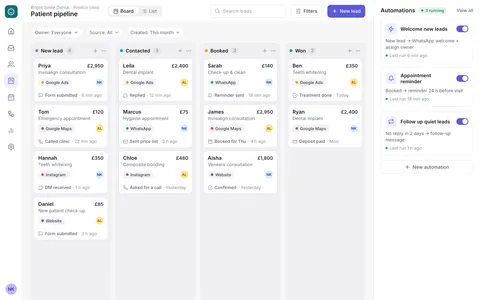
Leads land in different inboxes with no clear owner. We route each one to the right person in the CRM with a follow-up task attached.
-
Content takes too long to prepare
Product descriptions, ad variations and first drafts eat into the week. AI can draft from your own references, with a person checking facts and quality before anything is published.
-
Plenty of data, no clear picture
Analytics, the store, ad platforms and the CRM each tell part of the story. We bring the numbers into one dashboard, with alerts for changes that matter.
-
More customers means more manual work
Every new customer adds admin. We find what can be automated and compare the running cost with the time the task took before and after.

What we build and connect
-
Workflow automation
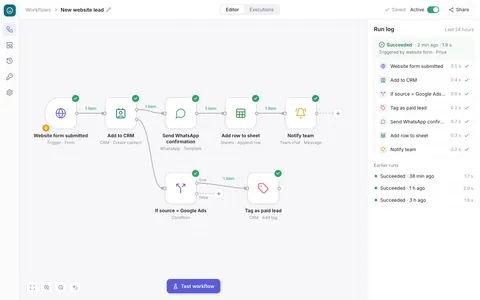
Repeat tasks turned into workflows that run on clear triggers and rules, built with no-code or low-code tools, or custom code where that fits better.
-
CRM integration and lead routing
Forms, ads, chat and email connected to your CRM, with each lead assigned, tagged and given a follow-up task. Lead scoring where the data supports it.
-
Customer-facing assistants
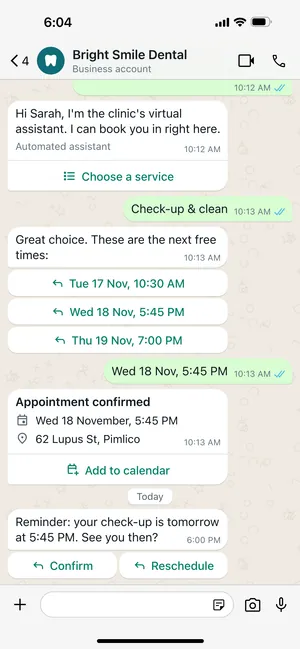
Assistants on your site or WhatsApp that answer from approved sources, collect enquiry details and hand over to your team when a question falls outside their limits.
-
AI for internal work
Drafts of product copy, ad ideas, replies and summaries, and product photo editing, all from your references and checked before use.
-
Reports and dashboards
Data from GA4, your store, ad platforms and the CRM in one place, with automated reports and alerts.
-
Email and follow-up automation
Welcome, follow-up and cart sequences triggered by events, with exclusion rules and limits on how often people are contacted.
-
Data access and permissions
We define what each workflow can read and change, keep read and write access apart, review providers and retention, and add approvals for sensitive steps.
-
Running costs and monitoring
Platform, API and AI model costs estimated for each workflow before it is built and tracked after, with a log of every run and alerts when something fails.

What we measure
- Time per task, before and after automation
- Error rates and cases that needed a person
- Lead response and follow-up times
- Running cost for each workflow
- How much your team actually uses the new tools
Questions about automation and AI
How is a custom AI assistant different from using ChatGPT directly?
We connect the assistant to specific knowledge sources and tools, and set its instructions and permissions for one job. That does not usually mean training a new model; we pick the approach that suits your data, budget and the level of control you need.
Do we need technical knowledge to use it?
No. We document how each workflow runs, how to follow alerts and what to do with cases flagged for review. The scope sets out who manages integrations, maintenance and changes after handover.
How long does it take to build?
It depends on the number of systems, data quality and permissions. We start with one limited workflow to test the value, then extend it once accuracy, cost and exceptions have been reviewed with your team.
How do you handle our data?
We define what data each workflow needs and who can access it, and review providers and retention policies before connecting anything. Read and write access can be kept separate, with approvals for sensitive steps.
Does the AI make decisions on its own?
Only within limits we agree together. Routine steps can run automatically, while financial decisions, publishing and major changes stay with a person, and every action is logged.
What does automation cost to run?
Running costs come from the platforms, APIs and AI models each workflow uses. We estimate them before building and track them afterwards, so you can weigh them against the time saved.
How do you measure success?
We agree measures such as task time, error rate, cases needing a person and running cost, and compare them with the previous process. We do not assume a fixed saving for every business.
Works well with

Email marketing
Segments, campaigns and automated journeys measured on deliverability and conversions.
Web design and development
Fast business websites, online stores and landing pages designed around one clear customer journey.

Google & social media ads
Google, Meta and TikTok campaigns managed against cost per lead and return on ad spend.
Is there a task your team repeats every day?
Book a call and tell us about it. We will tell you whether it is worth automating, and what it would take.